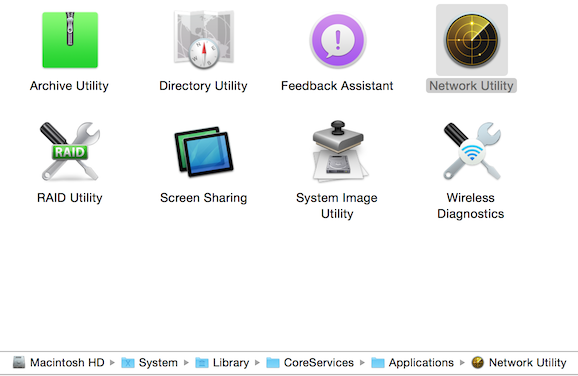
Network Utility in Finder Network Utility shown in Finder. Post author By Trevor Post date October 22, 2014 2 Comments on Network Utility in Finder Share this: Share on Facebook (Opens in new window) Facebook Share on X (Opens in new window) X Share on LinkedIn (Opens in new window) LinkedIn More Email a link to a friend (Opens in new window) Email Print (Opens in new window) Print Share on Pinterest (Opens in new window) Pinterest Share on Reddit (Opens in new window) Reddit Share on Tumblr (Opens in new window) Tumblr 2 replies on “Network Utility in Finder” My network utility is no where to found on my MacBook Air, I looked in the following path Macintosh HD > System > Library > CoreServices > Applications > Network Utility and there is nothing there (just a blank folder. How do I get it back? What version of MacOS are you running? Leave a Reply Cancel replyYour email address will not be published. Required fields are marked *Comment * Name * Email * Website Δ This site uses Akismet to reduce spam. Learn how your comment data is processed.
My network utility is no where to found on my MacBook Air, I looked in the following path Macintosh HD > System > Library > CoreServices > Applications > Network Utility and there is nothing there (just a blank folder. How do I get it back?
2 replies on “Network Utility in Finder”
My network utility is no where to found on my MacBook Air, I looked in the following path Macintosh HD > System > Library > CoreServices > Applications > Network Utility and there is nothing there (just a blank folder. How do I get it back?
What version of MacOS are you running?